Fileservice Portal

A guided tour of Revtech Fileservice

See how the flow works in practice: registration → order → upload → status → delivery.

Revtech Fileservice is a portal for creating orders, uploading the original file, tracking status, communicating in the same view, and downloading delivery — with per-job history.

Visit the portal

Want to click around yourself?

You can register and see exactly how the fileservice portal works.

Go to fileservice
Structured orders
Order forms keep the right info attached to the job — less back-and-forth, faster delivery.
Traceable history
Everything is saved per order: files, comments, and previous deliveries.
Clear communication
Messages are tied directly to the order — you always know what applies.
Built for workshops
Designed to handle many jobs without losing control.

Tour: registration, orders, dashboard, status, and delivery

Step 01

Create an account and enter the portal

The fileservice portal is your control panel: orders, files, messages, and history in one place.

Once you register, you can immediately create an order and track everything without email threads.

Quick to get started
  • Register an account
  • Log in
  • Submit your first file
  • Download when the job is completed
Screenshot: Create an account and enter the portal
Helpful to prepare

This is enough for us to move fast

  • Original file (read)
  • Clear request (goal + any limitations)
  • Relevant hardware changes (if anything is modified)
  • If you’re unsure: write it in the order — better too much info than too little
Step 02

Create an order and submit the required info (it becomes a job in the portal)

Every file you submit is handled through an order where you enter vehicle information and your request.

When you upload the original file inside the order, everything is linked automatically and becomes a job in the portal — traceable, clear, and with no risk of mixing things up when you have many jobs running.

Tips for faster turnaround
  • Be clear about your goal
  • Mention relevant hardware changes
  • If anything is uncertain — write it
  • Upload the correct original file in the order
Screenshot: Create an order and submit the required info (it becomes a job in the portal)
Why orders instead of “just sending a file”

The portal ensures every job has context and traceability. You can always see what was requested, what was delivered, and what was written.

When you have many jobs running

Status + history keep you in control. No more “mental list” or inbox tracking.

Step 03

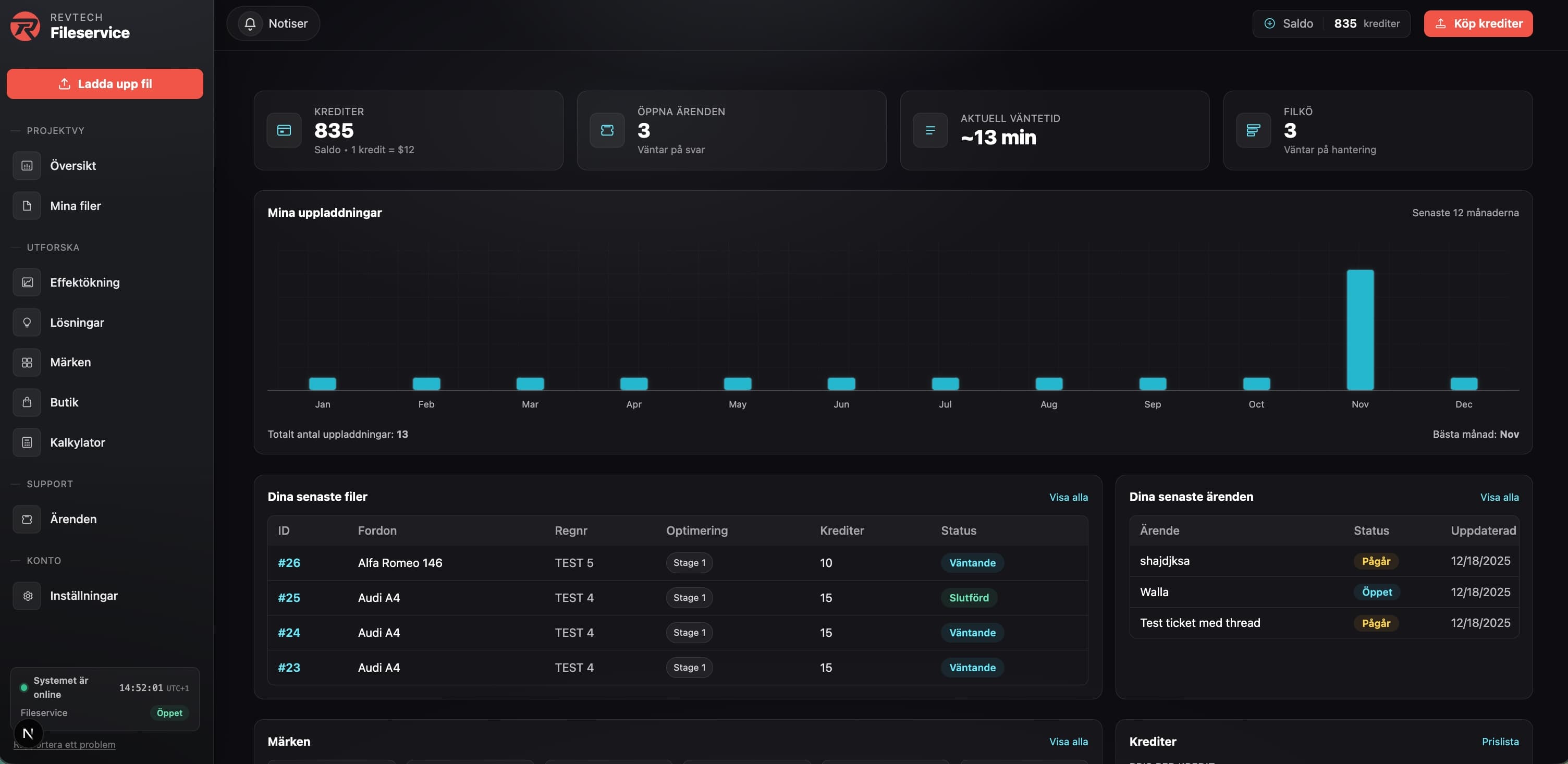
Dashboard: full overview of files, credits, and cases

In the dashboard you get a clear overview of everything related to your account: uploaded files/jobs, active and past orders, credits, and history.

You can also track and manage support cases/tickets in one place — no more hunting for updates across emails or separate threads.

Screenshot: Dashboard: full overview of files, credits, and cases
Quick answers
Can I track the status?
Yes — every order shows a clear status and log.
Do I have job history?
Yes — you can always go back to previous orders.
Where does communication happen?
Inside the order — everything stays grouped per job.
Step 04

Communication and status (everything in one view)

All communication happens inside the order — questions, answers, changes, and notes stay where they belong.

You always see the job status without chasing updates.

Why this beats email
  • Everything is logged per order
  • No inbox digging
  • Status is visible instantly
Screenshot: Communication and status (everything in one view)
Step 05

Delivery and history

When the job is completed, you download the finished file directly from the order.

History helps you quickly find previous jobs, reuse context, and follow up.

Screenshot: Delivery and history

Whitelabel portal

Run the portal under your own brand

Branded portal, your pricing, and permissions for your network. Ideal when you want customers/partners to see your brand end-to-end.

Whitelabel fits when you want to own the customer experience but avoid building the portal yourself. We brand it, set up access, and help you control pricing towards your partners.

What’s included

The whitelabel portal gives you control

You own the customer touchpoints, we run the portal.

Your brand first
We brand the portal with your name and profile.
Your pricing
Set internal pricing for partners/workshops.
Roles and access
Give local workshops logins for orders and status.
Oversight & history
See everything happening in the network without email mess.
A good fit if you…
  • Want the portal to show your brand
  • Run a network/partners and need price control
  • Need orders, status, and comms in one place
  • Want fast onboarding without your own dev work
The setup
We brand and configure the portal. You invite workshops/partners and set pricing. We operate and support the portal—while you own the customer relationship.

Use cases

Build your own portal without building the system

Common whitelabel scenarios.

How it works

We set up a dedicated instance with your name, domain, and visual profile. You choose which roles can create orders and track status. We attach your price lists and workflows.

Great for
Franchise models, partners/resellers, chains with local workshops, or when you want a portal for your own end customers.
Delivery
We onboard you, import branding, and set up access. You invite users and start the order flow right away.
Example use cases
  • Your brand facing resellers
  • Partner portal with your price list
  • Chains with local workshops
  • Packaging your services for other workshops
Outcome
Your own portal without development cost, clear price control, and a unified experience for your network.

Ready to test the flow?

Create an account and explore the portal in practice. It’s built to keep your work fast, clear, and without unnecessary friction.

Go to fileservice